Photo Booth Templates Free
Traditional photo booths charge $500-$1,500 to capture maybe 100 photos from one corner of your event. The templates—those branded frames and overlays printed on each photo—look professional but lock you into vendor designs and limit spontaneity.
What if you could get the interactive photo experience, the branded aesthetic, and comprehensive coverage of your entire event—not just one corner—for free or under $50? Modern digital photo
approaches make this possible, and we'll show you exactly how.
What Are Photo Booth Templates?
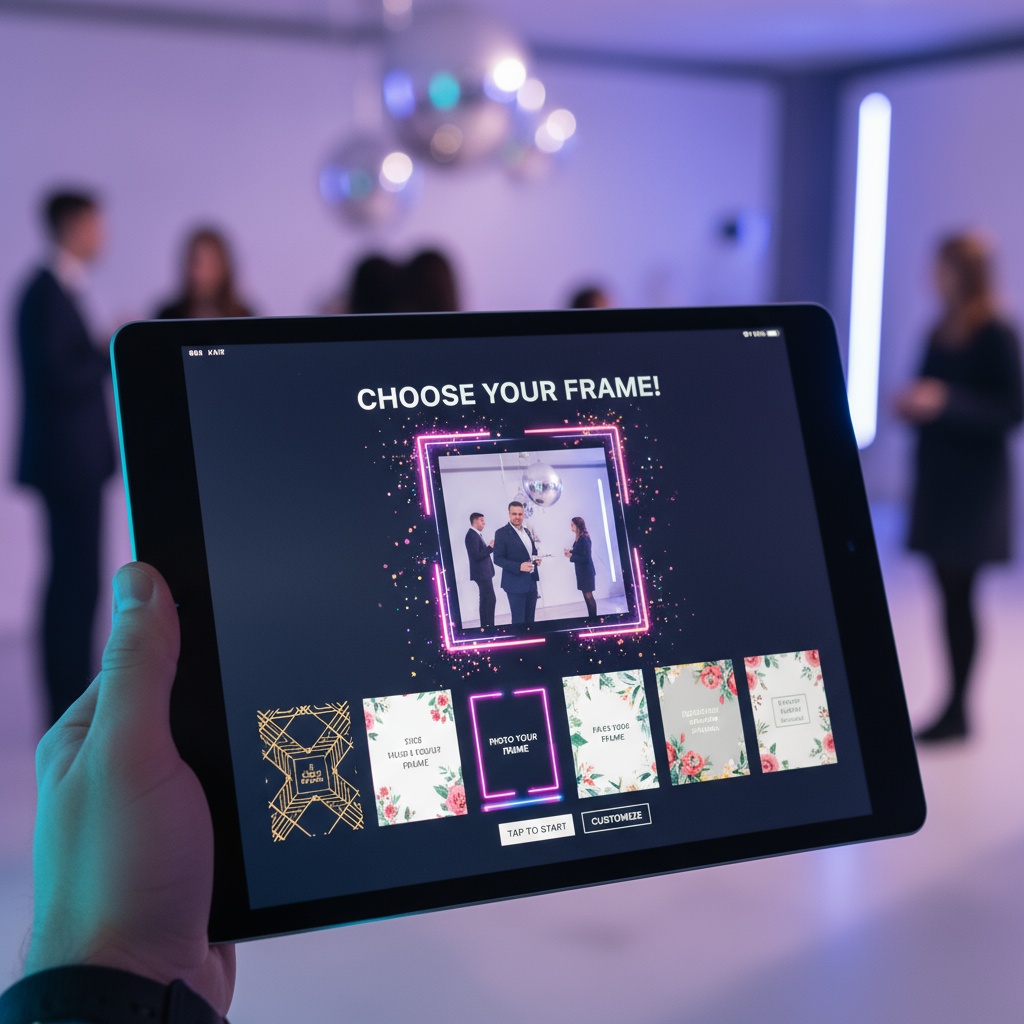
Traditional definition: Pre-designed frames, borders, and graphic overlays applied to photos taken in physical photo booths. Templates typically include:
- Event branding (names, dates, logos)
- Themed decorations (wedding florals, birthday balloons, corporate colors)
- Border designs (elegant frames, fun patterns, minimalist styles)
- Text overlays (hashtags, event names, thank-you messages)
Purpose: Create cohesive branded keepsake photos, make instant prints memorable, provide professional polish.
Traditional limitations:
- Locked to booth vendor's design options
- Applied only to booth photos (not guests' personal photos)
- Can't preview until event day
- Limited customization
- Photos only available in booth corner
Modern evolution: Digital templates you can apply to any photo from your event, customizable before and after the event, shareable across all guest contributions—not just booth corner shots.
Free Photo Booth Template Options
Option 1: DIY Printed Frame Template
How it works: Create physical frame guests hold while taking photos—mimics photo booth aesthetic without equipment rental.
Materials needed:
- Large posterboard or foam core (32x40 inches)
- Markers, paint, or printed graphics
- Box cutter for cutting center rectangle
- Decorations (matching event theme)
Design ideas:
Wedding:
┌─────────────────────────────────────┐
│   Sarah & Michael • June 15, 2025   │
│  [decorative florals or hearts]     │
│                                      │
│         ┌─────────────┐              │
│         │             │              │
│         │   GUESTS    │              │
│         │    POSE     │              │
│         │    HERE     │              │
│         └─────────────┘              │
│                                      │
│   #SmithWedding #HappilyEverAfter   │
└─────────────────────────────────────┘
Birthday:
┌─────────────────────────────────────┐
│      🎉 Emma's 30th Birthday 🎉      │
│                                      │
│         ┌─────────────┐              │
│         │             │              │
│         │    PHOTO    │              │
│         │    SPACE    │              │
│         └─────────────┘              │
│                                      │
│      #EmmaAt30 #BestYearYet         │
└─────────────────────────────────────┘
Corporate:
┌─────────────────────────────────────┐
│     [Company Logo]                   │
│   Annual Team Summit 2025            │
│         ┌─────────────┐              │
│         │             │              │
│         │   GUESTS    │              │
│         └─────────────┘              │
│                                      │
│    #TeamSummit25 #Innovation        │
└─────────────────────────────────────┘
Cost: $15-$30 in materials Time: 2-3 hours to create Advantages: Tactile keepsake, Instagram-friendly, reusable Limitations: Guests must hold frame, no instant prints, manual photo collection
Option 2: Canva Free Photo Booth Templates
How it works: Use Canva's free design tools to create digital photo overlays, then apply to collected photos post-event.
Process:
- Sign up for free Canva account
- Search "photo booth frame" templates
- Customize with your event details, colors, theme
- Download as PNG with transparent background
- After event, overlay template on guest photos using photo editing software
Free Canva templates include:
- Birthday party frames
- Wedding elegant borders
- Holiday themed designs
- Corporate event templates
- Graduation celebration graphics
Cost: Free (Canva free tier) Time: 30 minutes to customize template + 5 minutes per photo to apply Advantages: Professional designs, fully customizable, unlimited revisions Limitations: Post-event editing required, time-consuming for large photo volumes, no instant gratification during event
Option 3: Google Slides DIY Templates
How it works: Create your own photo booth frame template in Google Slides (free), print multiple copies, use as photo props.
Process:
- Open Google Slides, create new presentation
- Set slide size to 36x48 inches (custom size)
- Design your frame:
- Add text boxes with event name, date, hashtag
- Insert graphics, shapes, borders
- Leave center rectangle blank for faces
- Download as PDF
- Print at FedEx Office or local print shop ($20-40 for poster size)
- Cut out center rectangle
- Mount on foam core for stability
Cost: $0 design + $20-40 printing Advantages: Complete creative control, reusable, tactile experience Limitations: Requires design skills, printing logistics, manual photo collection
Option 4: Digital Photo Sharing with Virtual Templates
How it works: Skip physical booth entirely. Use QR codes for guest photo uploads, apply digital templates/branding to online gallery where all photos display.
Process:
- Create event on digital photo platform like Fotify
- Customize gallery branding (colors, logo, event name)
- Generate QR codes for guest uploads
- Guests scan → upload photos → see them displayed with branding
- Optional: Enable digital overlays/filters guests apply before uploading
Cost: $0-$50 (free tier or basic plan) Advantages:
- No physical setup required
- Applies to ALL event photos (not just booth corner)
- Live display during event
- Guests access gallery instantly
- Comprehensive photo collection from every perspective
Limitations: No physical printed photos during event (can order prints post-event)
Learn more about event photo sharing and how it modernizes the photo booth experience.
DIY Photo Booth Template Design Guide
Design Principles
1. Keep it simple
- One main message (event name OR hashtag, not both competing)
- Minimal text (readable from 5 feet away)
- Clear photo space (don't crowd the frame)
2. Brand consistently
- Match event colors
- Use same fonts as invitations
- Include cohesive graphics/motifs
- Professional polish vs cluttered amateur
3. Consider photo composition
- Frame shouldn't overwhelm faces
- Leave breathing room around photo space
- Horizontal orientation works for groups
- Vertical better for couples/individuals
4. Test before printing
- Print 8x10 test version first
- Check readability
- Verify colors match screen
- Adjust before final print
Free Design Tools
Canva (easiest for beginners):
- Drag-and-drop interface
- Thousands of free graphics
- Pre-made templates to customize
- No design skills required
Adobe Express (formerly Spark):
- Professional tools
- Free tier with good features
- Template library
- More advanced customization
GIMP (Photoshop alternative):
- Completely free
- Powerful editing capabilities
- Steeper learning curve
- Best for experienced designers
Google Slides (simplest):
- Already have access
- Basic shapes and text
- Easy collaboration
- Limited graphics library
Where to Print DIY Templates
FedEx Office (formerly Kinko's):
- Poster prints: $20-45
- Foam core mounting: +$15
- Same-day service available
- Upload online, pick up in store
Staples Print Center:
- Engineering prints (cheaper): $3-8 for large format
- Standard poster paper: $15-35
- Mounting options available
Local print shops:
- Often cheaper than chains
- Better quality options
- Personalized service
- Support local business
Home printing (budget option):
- Print 8.5x11 sheets, tape together
- Lower quality but $2-5 total
- Works for casual events
- Not recommended for formal events
Modern Alternative: Ditch Templates, Embrace Digital
Reality check: Photo booth templates look nice, but they solve yesterday's problem. Today's challenge isn't adding frames to photos—it's collecting all the great photos your guests are already taking.
Traditional booth with template:
- Captures 80-100 photos from booth corner
- Professional frames applied
- Guests wait in line
- $600-1,500 cost
- Misses 90% of event moments happening elsewhere
Digital photo sharing (no traditional template needed):
- Captures 300-800 photos from entire event
- Optional digital branding/watermarks
- No lines, no waiting
- $0-$50 cost
- Comprehensive coverage of all moments, all locations
The trade:
- You lose: Instant physical prints with fancy frames
- You gain: 5-10x more photos, complete event coverage, live displays, instant digital access
For most events, this trade is worth it.
Free vs Paid Photo Booth Solutions
| Solution | Cost | Photos Captured | Setup Time | Coverage | Instant Prints |
|---|---|---|---|---|---|
| DIY Physical Frame | $15-40 | 50-100 | 2-3 hours | One location | No |
| Canva Digital Templates | Free | Unlimited (post-event edit) | 30 min design | All locations (if collecting digitally) | No |
| Traditional Photo Booth | $600-1,500 | 80-120 | None (vendor handles) | Booth corner only | Yes |
| Digital Photo Sharing | $0-$50 | 300-800+ | 5 minutes | Entire event | No (can order post-event) |
| Hybrid: Digital + Print Service | $50-150 | 300-800+ | 5 minutes | Entire event | Yes (ordered post-event) |
Best value: Digital photo sharing delivers 10x more photos at 1/10 the cost of traditional booths, with the option to order prints of favorites afterward rather than printing every booth photo most people don't want.
Implementing Your Free Photo Booth Template Strategy
For Small Events (Under 30 People)
Recommended approach: DIY printed frame
Why:
- Intimate gatherings appreciate tactile experience
- Lower photo volume manageable
- Frame becomes conversation piece
- Cost-effective for small scale
Implementation:
- Design frame in Canva (1 hour)
- Print at FedEx Office ($25)
- Mount on foam core for stability
- Position with good lighting
- Encourage guests to take photos with frame
- Collect photos via QR code upload
For Medium Events (30-150 People)
Recommended approach: Digital photo sharing with branded gallery
Why:
- Photo volume too high for physical frames
- Guests already taking photos everywhere
- Live display creates engagement
- Comprehensive coverage essential
Implementation:
- Create event on digital platform (5 min)
- Customize gallery branding to match event theme
- Generate QR codes (automatic)
- Share QR codes via signage throughout venue
- Optional: Set up live display screen
- Collect hundreds of branded photos automatically
Optional add-on: Create one DIY frame for Instagram photo op (combines tactile experience with digital collection)
For Large Events (150+ People)
Recommended approach: Digital photo sharing + optional professional print booth
Why:
- Physical frames can't scale
- Need comprehensive digital collection
- Large budget justifies premium experience
- Professional prints for VIPs
Implementation:
- Digital photo sharing platform for comprehensive collection
- Optional: Add traditional booth for formal posed photos
- Both feed into same digital gallery
- Maximize coverage while providing print option
- Post-event: Order prints of best digital photos for albums
Free Photo Booth Templates FAQ
Where can I find free photo booth templates?
Canva offers hundreds of free photo booth frame templates you can customize with your event details—search "photo booth frame" or "photo booth overlay" in their template library. Download customized designs as PNG files, then either print as physical frames ($20-40 at FedEx Office) or apply as digital overlays to event photos post-event using free photo editing software.
Can I create my own photo booth template without design skills?
Yes, using Canva's drag-and-drop interface. Choose a pre-made template, replace text with your event name/date, change colors to match your theme, add graphics from their free library, and download. No design experience required—most people create custom templates in under 30 minutes. Google Slides also works for simple text-based frames.
How much does it cost to print a DIY photo booth template?
FedEx Office and Staples charge $20-45 for poster-size prints (32x40 to 36x48 inches), plus $10-15 for foam core mounting for stability. Engineering prints at Staples cost less ($3-8) but lower quality. Home printing by taping together 8.5x11 sheets costs $2-5 but looks unprofessional. Budget $25-60 total for quality printed template.
Is a physical photo booth frame or digital photo sharing better?
Digital photo sharing delivers 5-10x more photos (300-800 vs 50-100) at lower cost ($0-$50 vs $600-1,500 for traditional booth or $30-60 for DIY frame). Physical frames provide tactile Instagram-worthy experience but only capture photos in one location. Best approach for medium/large events: Digital sharing for comprehensive coverage + optional single DIY frame for photo op.
Can I apply photo booth templates to photos after an event?
Yes, design templates in Canva with transparent backgrounds, download as PNG files, then overlay onto collected photos using free editing software like GIMP, Photoshop Express, or even PowerPoint. This takes 3-5 minutes per photo, manageable for small collections (under 50 photos) but impractical for events where you collect hundreds of guest photos.
Do digital photo platforms offer free template features?
Many digital photo sharing platforms include basic branding customization (colors, logos, event names) in free tiers, with advanced template features in paid plans ($25-75). Unlike traditional booth templates that only apply to booth photos, digital platform branding applies to entire gallery of guest-uploaded photos—every photo gets consistent branded experience without individual editing.
What size should I make a DIY photo booth frame?
Create frames 32x40 to 36x48 inches for comfortable group photos. Cut center rectangle approximately 24x30 inches, leaving 4-8 inch borders for design elements. Test by having 2-4 people stand behind frame—faces should be clearly visible without frame edges cutting off heads. Vertical orientation works for couples, horizontal for groups of 4+.
How do I collect photos taken with DIY photo booth frames?
Place QR code sign next to DIY frame instructing guests to scan and upload their photo booth frame pictures. This collects frame photos digitally alongside all other event photos in one gallery. Alternative: Designate friend as photographer to take photos of guests with frame, then upload to shared gallery, but QR code upload gives guests more control and spontaneity.
Can I reuse photo booth templates for multiple events?
Physical frames with generic designs ("Celebrating!" instead of specific names/dates) can be reused, but most people prefer personalized templates for special events. Digital templates can be saved and adapted—change names/dates/colors but keep overall design structure. Canva saves your designs indefinitely in free account for easy modification and reuse.
What's the fastest way to get free photo booth templates for an event?
Use Canva: sign up free, search "photo booth frame," pick template matching your event style (wedding/birthday/corporate), customize text (5 minutes), download PNG, and either upload to print shop same-day ($25-40) or use digitally. Total time from start to finished design: 30 minutes. For completely free solution, design in Google Slides and print 8.5x11 sheets at home to tape together.
Making Photo Booths Work Without Breaking the Budget
Photo booth templates don't have to cost $1,000+ in vendor fees. DIY physical frames provide the tactile Instagram-worthy experience for $15-40 in materials. Digital templates via Canva cost $0 and can be applied post-event.
But the real modern solution eliminates templates entirely: comprehensive digital photo collection captures your entire event, not just one corner, at a fraction of traditional costs. Optional branding and display features provide the cohesive aesthetic templates aimed for—across hundreds of photos instead of just 100 booth shots.
Choose your approach:
- Small intimate gatherings: DIY printed frame ($30) + digital collection
- Medium events: Digital photo sharing with branded gallery ($0-$50)
- Large events: Digital comprehensive coverage + optional traditional booth for VIPs
Ready to skip expensive booth rentals? Create your event with digital photo collection and optional branding. From backyard parties to corporate galas, photo experiences that capture everything.
Explore more photo solutions: event photo sharing and introduction to Fotify.
Photo booth templates made simple—free DIY options and modern digital alternatives that capture more memories for less. Start creating today.
Related Pages
Discover how Fotify can transform your events