At most weddings, the two families and the two friend groups barely know each other, and the usual fixes, like a singles table or introductions by the couple, can feel awkward. With Match & Connect, single guests can browse each other privately during the cocktail hour, and only the people who like each other back find out. The bride's cousin and the groom's college roommate can match before the first dance and say hi in the chat without anyone being put on the spot.
Add-on for your Fotify event
Event Matchmaking App: Help Your Guests Meet
Guests scan a QR code, make a short profile and swipe through the other people at your event. When two people like each other, they can chat in the app and find each other in the room. There's nothing to install.
- Social mode for weddings, parties and singles nights
- Business mode for conferences and networking events
- Chats and contact details only between people who matched
$9.99 per event · Included in the Professional plan · Free trial with 4 guests
Nothing to install
Opens in the phone's browser
Private by default
Only matches can chat
I have never experienced this level of dedication, professionalism, and genuine willingness to help. New features were even implemented at my request. The event ran smoothly and was a real success.Katarzyna Bergier · Event organizer
What your guests see
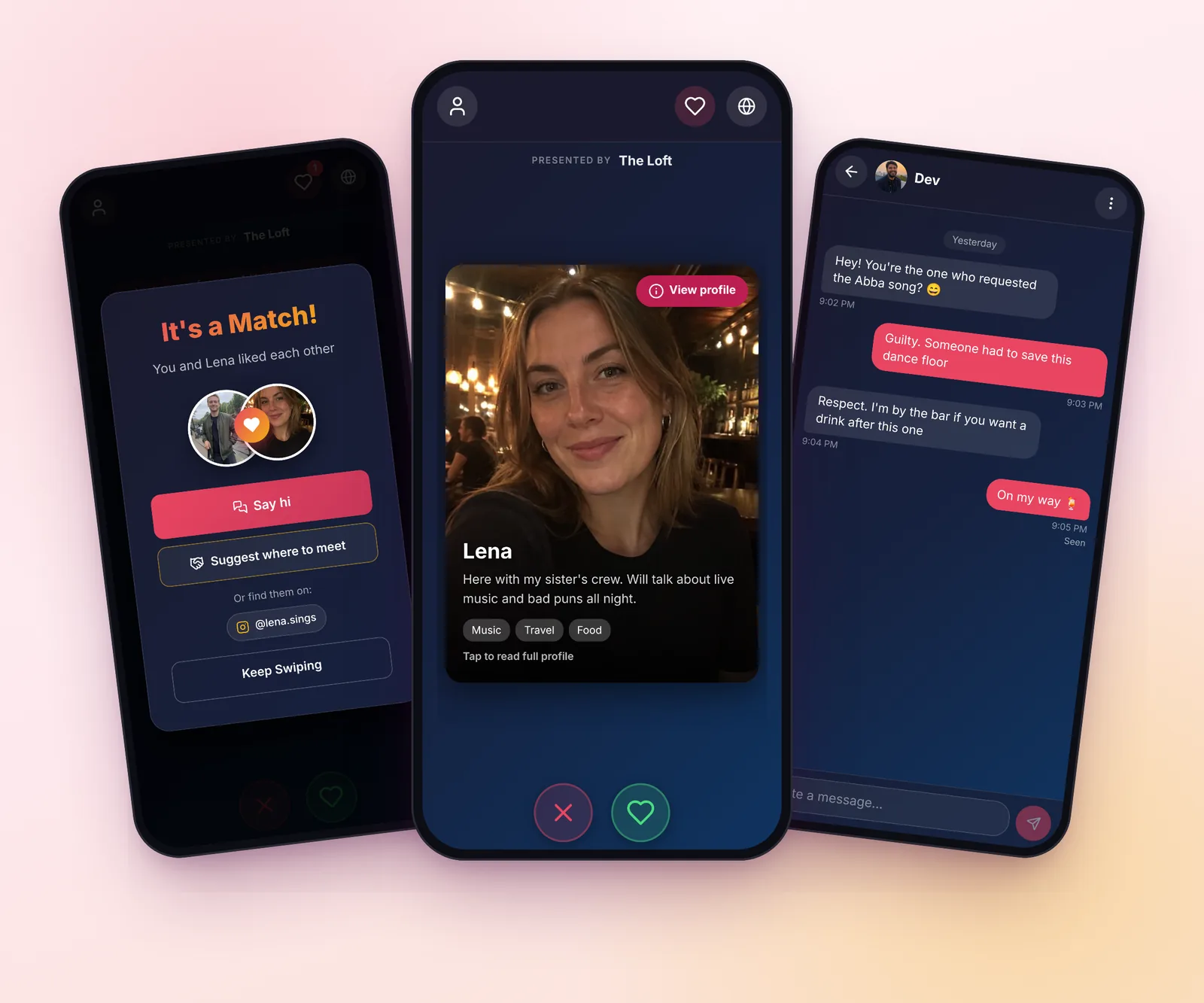
Real screens from the guest app.
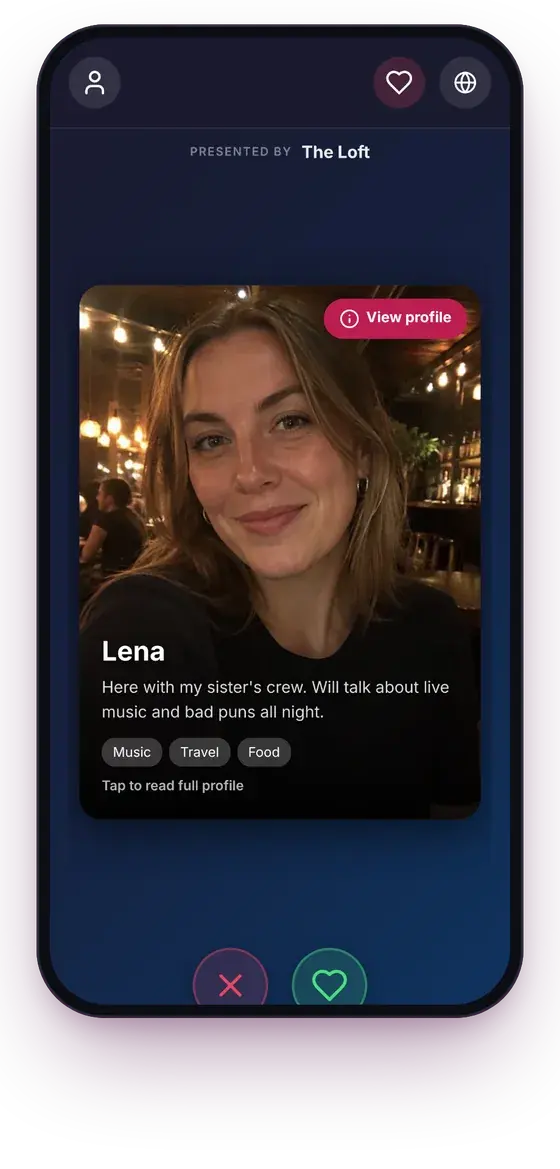
Swipe through who's here
Each card has a photo, a line about the person and a few interests. Nobody sees who skipped them.
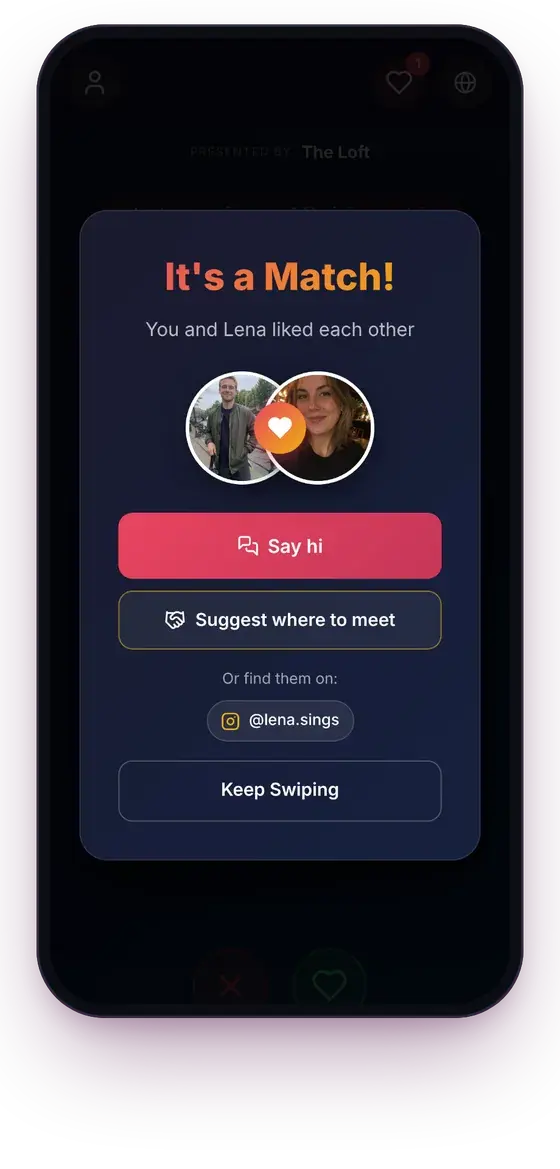
It's a match
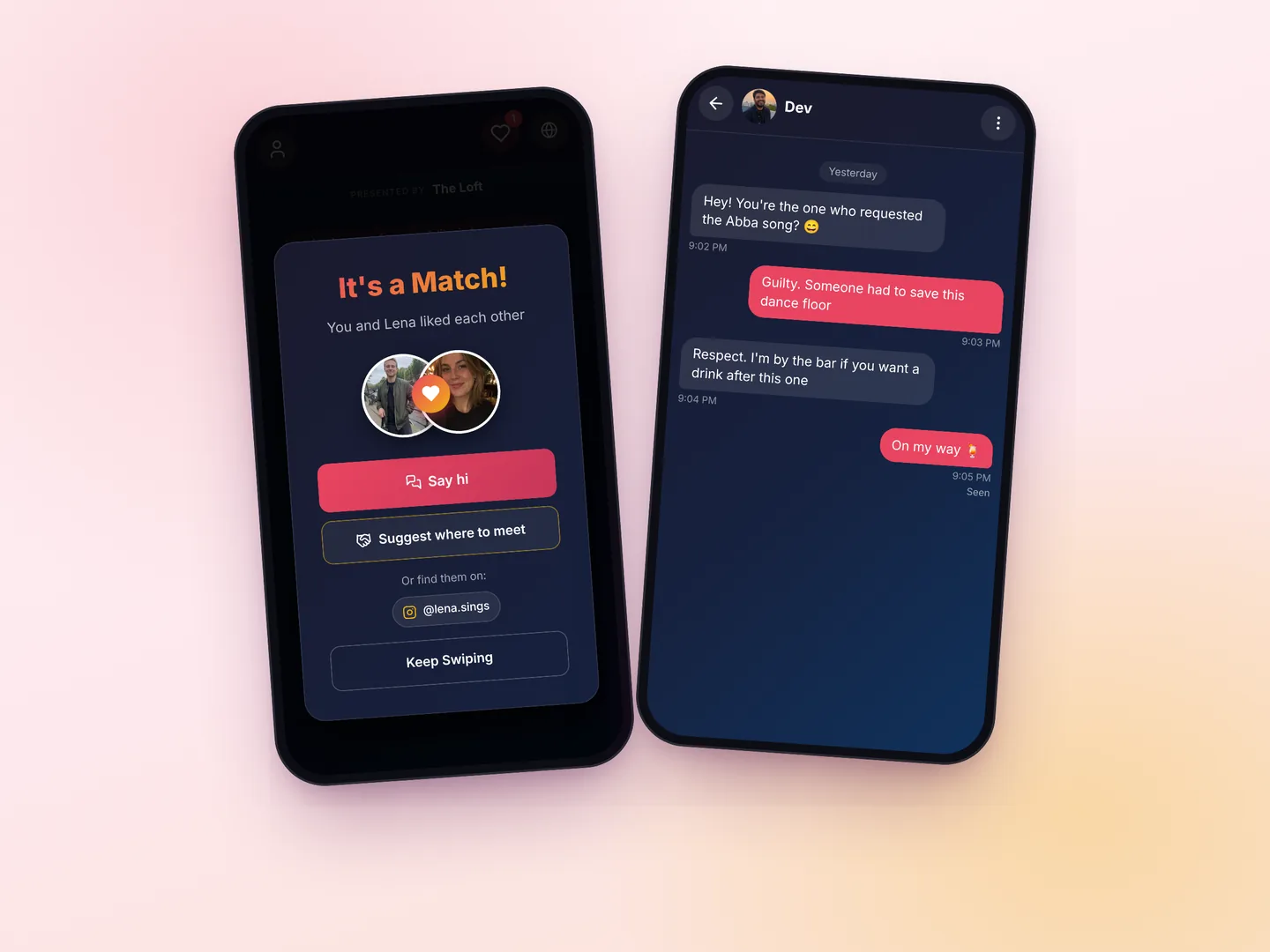
When the like goes both ways, both guests see it, and they can say hi straight away.
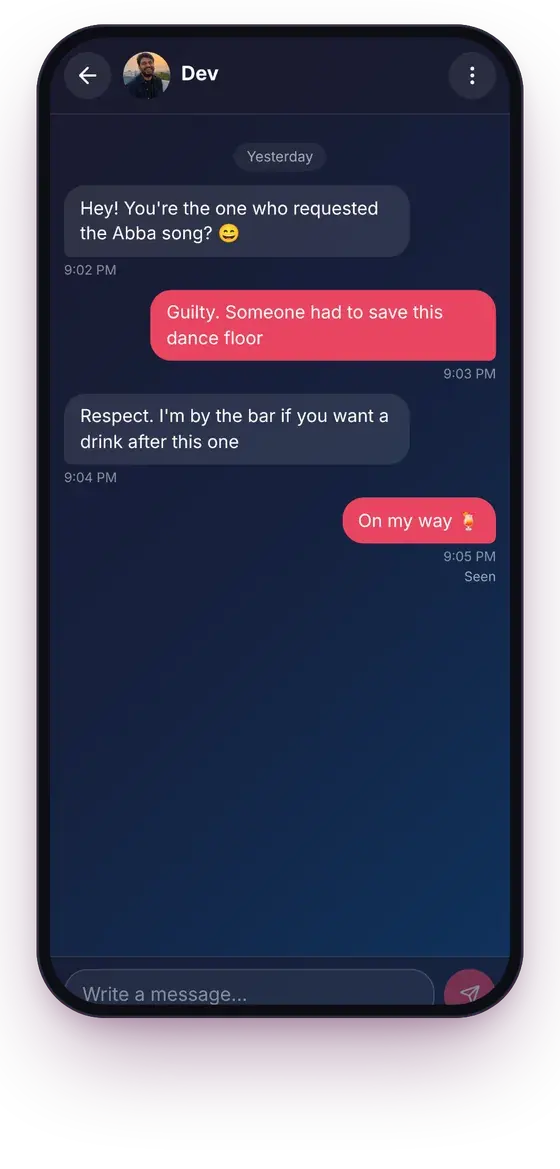
Chat in the app
Matches message each other without swapping numbers. Either side can block or report.
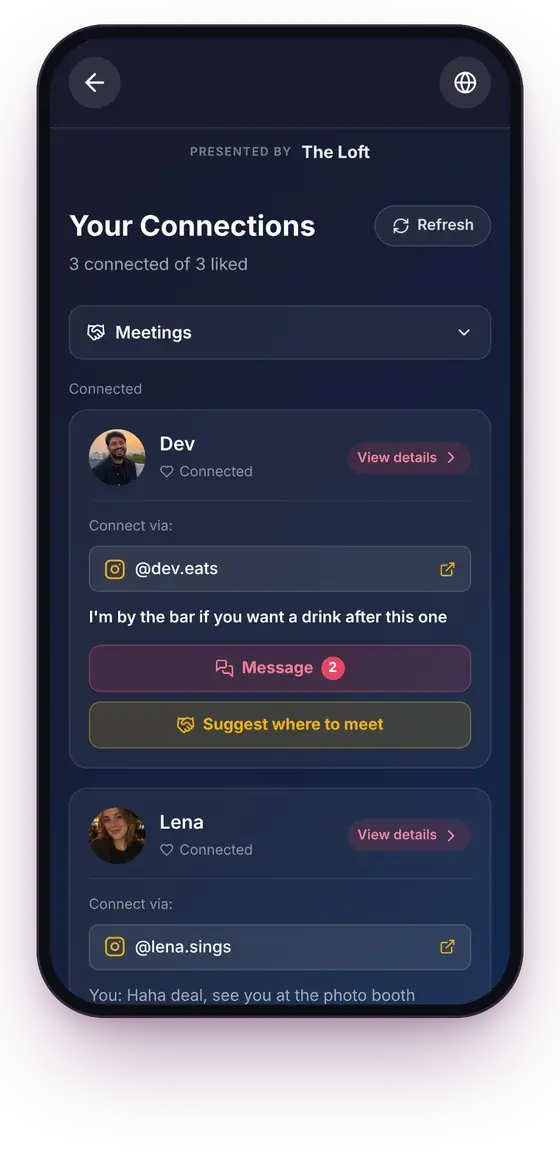
All their matches
Each match with its chat, the contact details they chose to share, and a way to suggest where to meet.
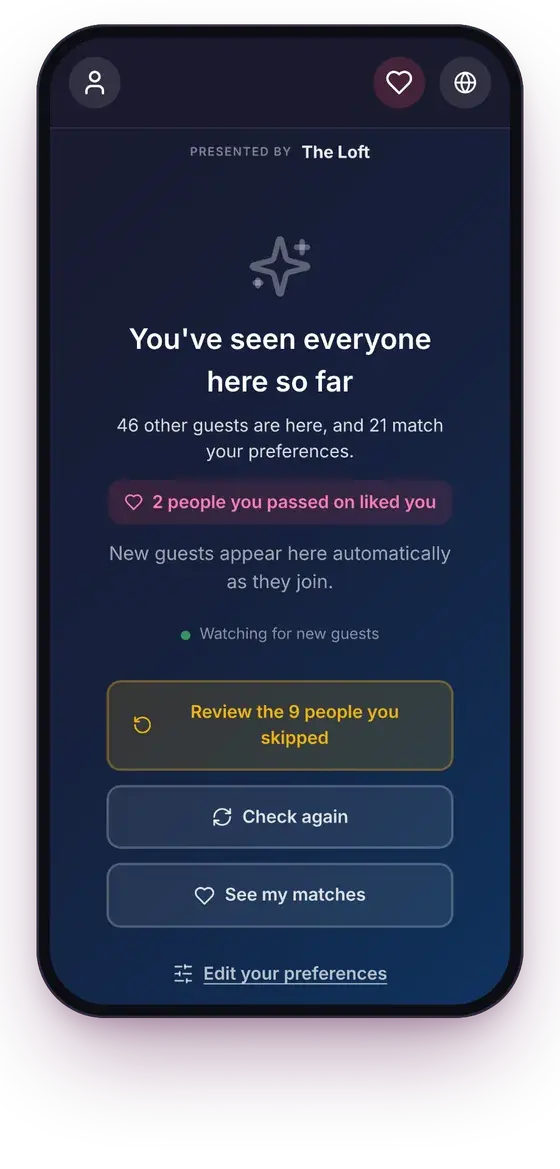
No dead ends
When they've seen everyone, the app says so, slides new guests in as they join, and tells them if someone they passed on liked them.
What's included
Everything a guest needs to meet someone at your event, and nothing they have to download.
A profile in under a minute
A photo, a first name, a line about themselves and a few interests. Instagram, WhatsApp or a phone number are optional.
Preferences on both sides
Guests say who they'd like to meet, and they only see people whose preferences include them too.
Mutual matches only
Nobody can message a guest who hasn't liked them back, and contact details show only after a match.
Chat, block and report
Messages stay inside your event. A blocked guest disappears from the other person's app, and reports are emailed to you.
Meet in the room
Matches can suggest a time and a place to meet. You can list the spots, like the bar or the photo booth.
Deleted after the event
Guests can read their matches and chats for 7 days after your event ends. Then matches, messages, photos and contact details are deleted.
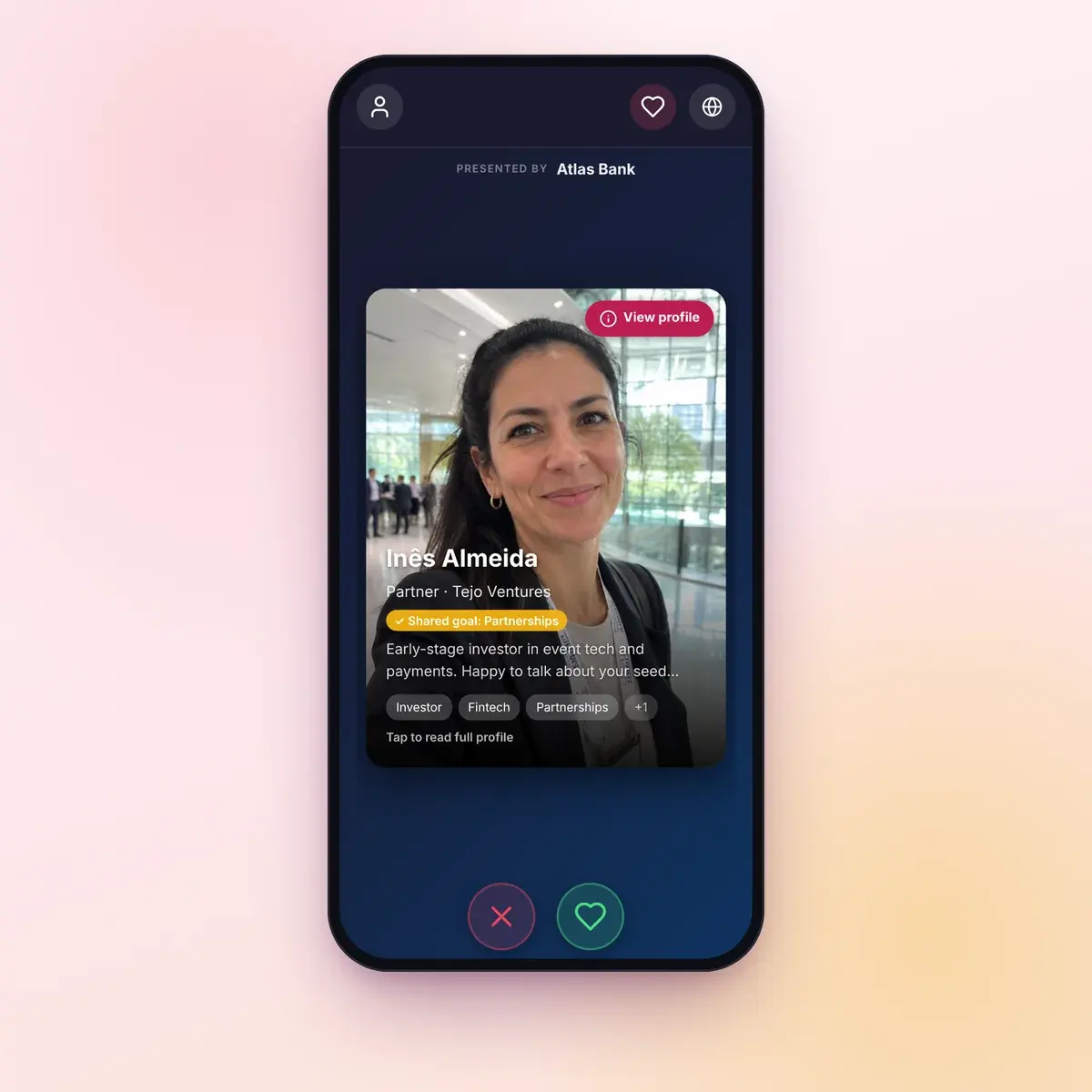
Business mode for conferences and networking events
You pick the mode per event. In Business mode attendees share their role, their company and what they're looking for instead of dating preferences, and the deck puts the most relevant people first.
- You choose the fields: role, company, industry, organization type, goals, and what each person is looking for and can offer
- Each card says why that person is suggested, like a shared goal or a complementary organization
- Matches see each other's LinkedIn and can book a meeting through a calendar link
- Emails that suggest a few people worth meeting, which attendees can accept or pass on (you can switch them off)
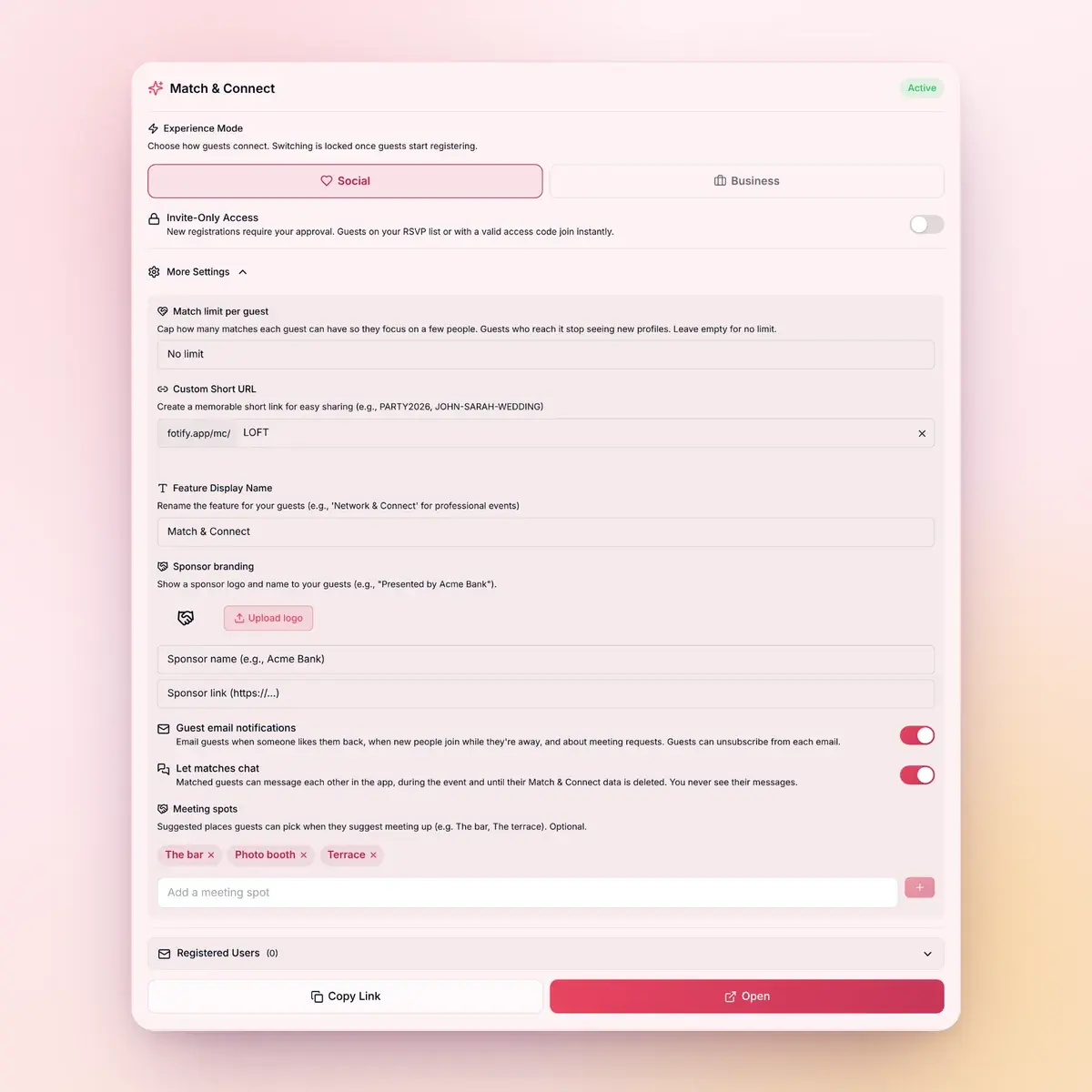
You decide who gets in and how it works
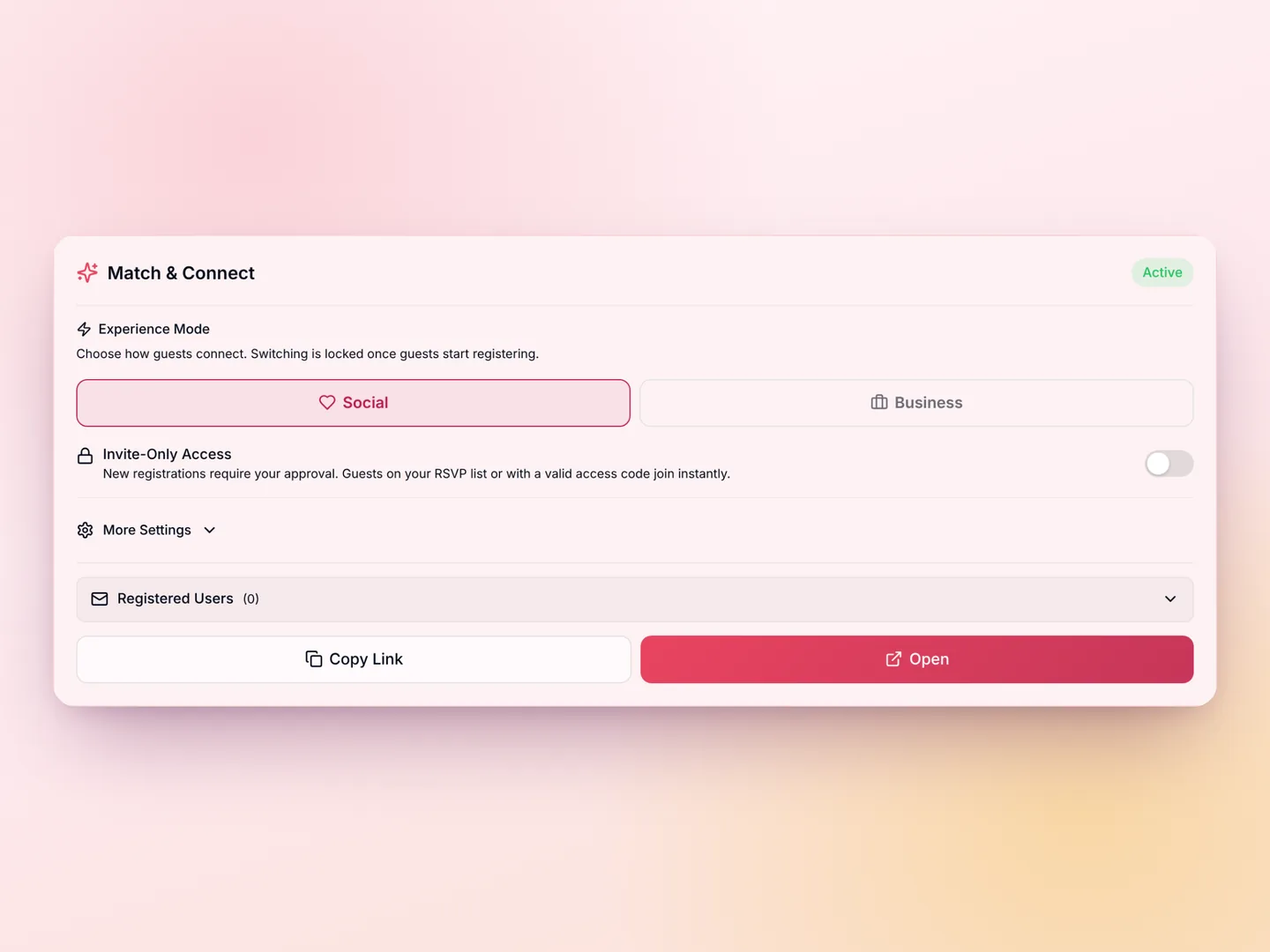
Everything is set from the event's card in your dashboard, and you can change it while the event runs.
- Invite-only: approve each guest, or let in your RSVP list, a list of emails or anyone with an access code
- A cap on how many matches each guest can make
- A short link like fotify.app/mc/YOUR-EVENT, your own domain, and your own name for the feature
- A sponsor strip across the top of the guest app
- The list of registered guests, and how many profiles and matches there are
- Chat on or off
Where it works
Any event where people would like to meet each other but don't know where to start.
Weddings
The singles table without the singles table. Guests from both sides find each other on their own, and nobody is put on the spot.
Match & Connect for weddingsConferences & corporate events
Business mode puts the right people in front of each other, and every match comes with a way to book a meeting.
Match & Connect for conferencesSingles nights & parties
Singles nights, mixers, birthdays and reunions: guests who came with friends leave having met someone new.
Try it freeHow it works
Set up in a few minutes from your event's dashboard.
1
Turn it on for your event
Start a free trial with 4 guests, or add Match & Connect for $9.99. It's included in the Professional plan. Then choose Social or Business mode.
2
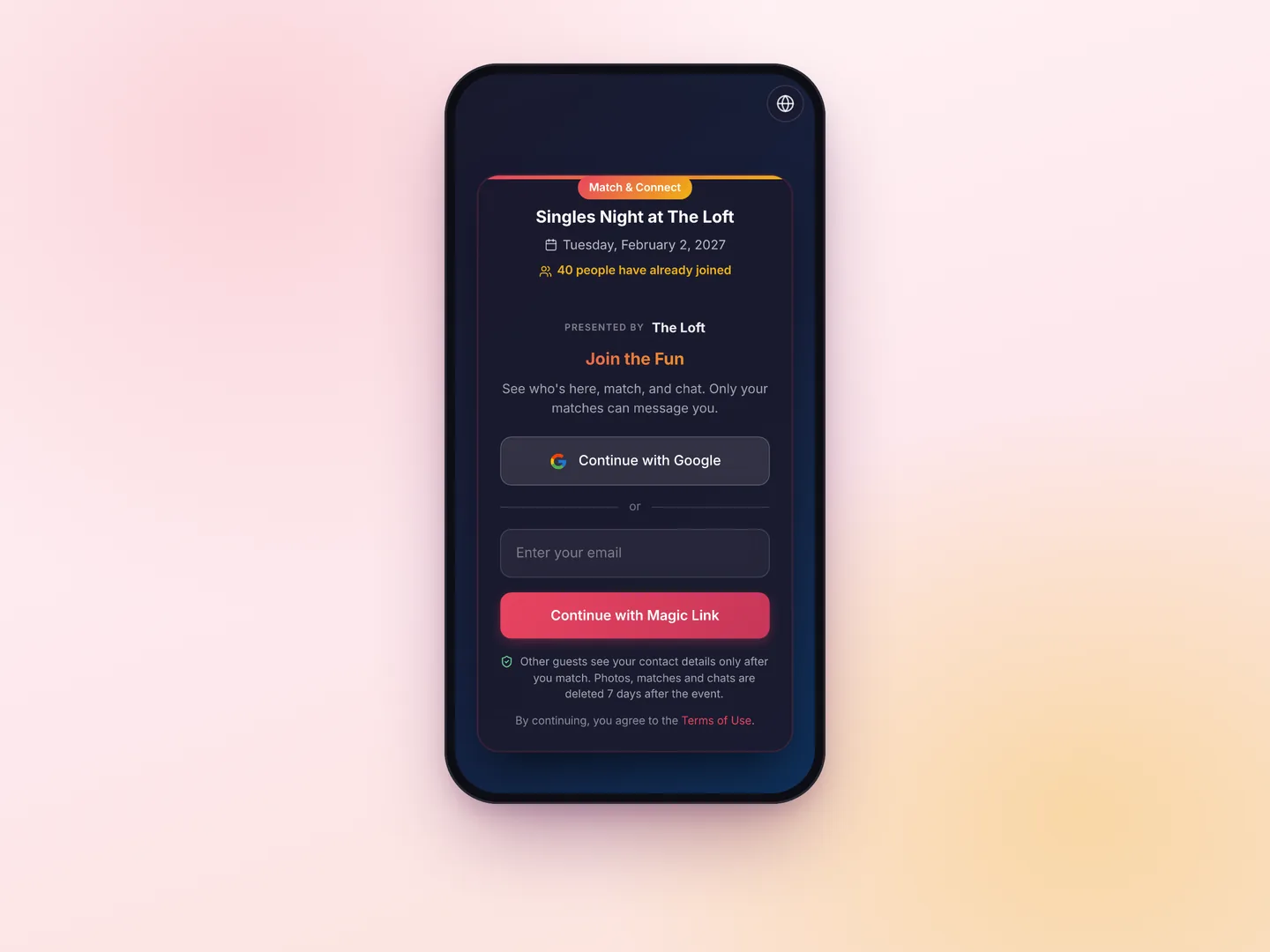
Share the link or QR code
Put the QR code on the tables or the screen, or send the link. Guests sign in with Google or a code sent to their email, and make their profile.
3
Guests match, chat and meet
Matches can chat straight away and suggest where to meet. Guests who stepped away get an email when someone likes them back or messages them.
An event matchmaking app guests actually use
Match & Connect turns the people at your event into a deck of profiles. Guests open it from a QR code or a link, make a profile with a photo and a few interests, and like or skip the other guests. When two people like each other they match, can chat in the app, and can suggest a place to meet in the room. Nobody can message a guest who hasn't liked them back, and contact details only appear after a match. It runs in the phone's browser, so nobody has to install anything.
- Mutual matches only: chats and contact details stay closed until both people like each other
- A swipe deck guests already know how to use
- Social mode for weddings, parties and singles nights, Business mode for conferences
- Invite-only access with approvals, RSVP lists, email lists and access codes
- Runs in any phone browser, with sign-in by Google or an email code
- Matches, chats and photos are deleted 7 days after the event
A networking app for conferences and corporate events
Name badges don't tell you who's worth talking to. In Business mode, attendees share their role, company, industry and goals, plus what they're looking for and what they can offer. The deck puts the most relevant people first and says why each one is suggested, for example a buyer and a supplier, or a startup and an investor. When two attendees match, they see each other's LinkedIn and can book a meeting through a calendar link.
Speed dating events and singles nights
For a singles night, create the event, turn on Match & Connect and put the QR code at the door and on the tables. Guests make a profile in about a minute and start swiping. Matches can chat and suggest where to meet in the venue, and guests who step outside get an email when someone likes them back. You can cap the number of matches per guest, keep the night invite-only, and give it a short link like fotify.app/mc/YOUR-EVENT. You pay per event, with no subscription.
Parties, reunions and big birthdays
At a party where half the guests only know the host, Match & Connect gives people a reason to start a conversation. Use Social mode and set who each guest wants to meet, or keep it open to everyone for making friends. Guests who matched can find each other on the dance floor or carry on in the chat after the party, for 7 days.
How to run matchmaking at your event
From your event's dashboard, start the free trial with 4 guests or add Match & Connect, choose Social or Business mode, and start the event. Then share the guest link or print the QR code. Decide whether anyone can join or only guests you approve, add the spots where matches can meet, and watch profiles and matches come in on the event's card. The help article walks through every setting.
How it compares to conference networking platforms
Networking platforms built for large trade shows usually come with a contract, an onboarding call and an app attendees have to download. Match & Connect is priced per event, runs in the browser, and you set it up yourself in a few minutes. It doesn't replace a full conference platform with agendas and exhibitor booths. It does one thing: it helps the people in the room find the ones they want to meet.
Choose Your Perfect Plan
Start creating unforgettable events with our flexible pricing options
100% Money Back Guarantee
Try Fotify risk-free. If you're not completely satisfied with your event, we'll refund your purchase. No questions asked.
View our refund policy →Frequently asked questions
About Match & Connect
What is an event matchmaking app?
An app that helps the people at one event find each other. Guests make a short profile, browse the other guests and like the ones they'd like to meet. When two people like each other, they match and can start talking. Match & Connect works for weddings, parties, singles nights, conferences and networking events.
How do guests get in?
They scan a QR code or open a link in their phone's browser; there's no app to install. They sign in with Google or with a 6-digit code sent to their email, make a profile in about a minute and start swiping.
Can I use it as a wedding icebreaker?
Yes, it's one of the most common uses. Single guests browse each other privately, and only the people who like each other back find out. Matches can say hi in the chat and suggest where to meet at the venue, so nobody has to make the first move in front of everyone.
Can I host a speed dating event or a singles night with it?
Yes. Create the event, turn on Match & Connect and put the QR code at the venue. Guests can be swiping within minutes of arriving. You can cap the matches per guest, make the night invite-only, and list meeting spots in the venue. If you run timed rounds, announce the rotations yourself; the matching happens in the app.
Does it work for corporate events and conferences?
Yes, with Business mode. Attendees share their role, company, industry and goals instead of dating preferences, the deck puts the most relevant people first, and each card says why that person is suggested. Matches see each other's LinkedIn and can book a meeting through a calendar link.
How does it compare to Brella, Swapcard, Grip or b2match?
Those are full platforms for large B2B conferences, usually sold with a contract and an attendee app. Match & Connect does one part of that job, helping attendees find each other, and it's priced per event, runs in the browser and takes a few minutes to set up. If you need agendas, exhibitor booths or lead scanning, you need a full platform.
When do guests see each other's contact details?
Only after a match. Contact details (Instagram, WhatsApp, a phone number or LinkedIn) are optional, and before a match a profile shows only the photo, first name, bio and interests. Matches can also just use the chat.
Can guests block or report someone?
Yes. From a chat, a guest can block the other person, who then disappears from their app and can't match with them again, or report them. Reports are emailed to the event's organizers.
Can I make my event invite-only?
Yes. With invite-only access, new profiles wait for your approval. Guests on your RSVP list, guests on an email list you upload, and guests with a valid access code get in straight away.
Can I give it my own name and link?
Yes. You can rename the feature (for example "Meet & Greet" or "Network"), use a short link like fotify.app/mc/YOUR-EVENT, or run it on your own domain.
How much does Match & Connect cost?
It's $9.99 per event, and it's included in the Professional plan. You can try it first with 4 guests for free, and the matches made during the trial are kept when you add it. There's no subscription and no price per attendee.
Can I see how many matches are made?
Yes. The event's card in your dashboard shows how many guests made a profile and how many matches there are, and lists the registered guests. In Social mode you never see who matched with whom, and in either mode you never see what guests write to each other. In Business mode there's also a connections report: the pairs who both agreed to be contacted after the event, with their name, company and LinkedIn.
What's the difference between Social mode and Business mode?
Social mode is for meeting people: guests share a photo, a bio, interests and who they'd like to meet. Business mode is for networking: guests share their role, company, industry and goals, the deck is ordered by relevance, and matches see each other's LinkedIn and booking link. You choose the mode per event.
How are business attendees matched?
In Business mode the deck isn't random. It puts first the people whose organization and goals complement each other, like a supplier and a buyer or a startup and an investor, then people with shared goals, the same industry or overlapping expertise. Each card shows the main reason it's suggested.
Help your guests meet each other
Try it with your first 4 guests before you pay anything.
Start the free trial$9.99 per event after the trial · Included in Professional
Free trial